


精通 Python 字符串:创建、格式化与操作
Python 字符串
本教程将教你在 Python 中创建、格式化、修改和删除字符串,并介绍各种字符串操作与函数。
视频:Python 字符串
Python 中的字符串是什么?
字符串是字符序列。
字符就是符号。例如英语有 26 个字符。
计算机不处理字符,而是处理数字(二进制)。即使屏幕上显示字符,内部也是以 0 和 1 的组合存储和操作。
字符到数字的转换叫编码,逆过程叫解码。ASCII 和 Unicode 是常用编码。
Python 中字符串是 Unicode 字符序列。Unicode 旨在涵盖所有语言字符,统一编码。可从 Python Unicode 了解更多。
如何在 Python 中创建字符串?
字符串可用单引号、双引号或三引号括起字符创建。三引号通常用于多行字符串和文档字符串。
# 在 Python 中定义字符串
# 以下均等价
my_string = 'Hello'
print(my_string)
my_string = "Hello"
print(my_string)
my_string = '''Hello'''
print(my_string)
# 三引号字符串可跨多行
my_string = """Hello, welcome to the world of Python"""
print(my_string)
运行程序输出:
Hello Hello Hello Hello, welcome to the world of Python
如何访问字符串字符?
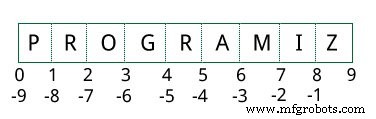
可用索引访问单个字符,用切片访问字符范围。索引从 0 开始。越界访问引发 IndexError。索引必须为整数,不能用浮点数等,否则引发 TypeError。
Python 支持序列的负索引。-1 指最后一项,-2 指倒数第二项,以此类推。可用切片操作符 : 访问范围。
# Python 中访问字符串字符
str = 'programiz'
print('str = ', str)
# 首字符
print('str[0] = ', str[0])
# 末字符
print('str[-1] = ', str[-1])
# 切片第 2 到第 5 字符
print('str[1:5] = ', str[1:5])
# 切片第 6 到倒数第 2 字符
print('str[5:-2] = ', str[5:-2])
运行输出:
str = programiz str[0] = p str[-1] = z str[1:5] = rogr str[5:-2] = am
若访问越界索引或用非整数,会报错:
# 索引必须在范围内
>>> my_string[15]
... IndexError: string index out of range
# 索引必须为整数
>>> my_string[1.5]
... TypeError: string indices must be integers
切片可视为索引位于元素之间,如下图所示。访问范围需用切片索引。
如何修改或删除字符串?
字符串不可变。一旦赋值,元素不能更改。只能将不同字符串重新赋值给同名变量。
>>> my_string = 'programiz'
>>> my_string[5] = 'a'
... TypeError: 'str' object does not support item assignment
>>> my_string = 'Python'
>>> my_string
'Python'
无法删除字符串中的字符。但可用 del 关键字删除整个字符串。
>>> del my_string[1]
... TypeError: 'str' object doesn't support item deletion
>>> del my_string
>>> my_string
... NameError: name 'my_string' is not defined
Python 字符串操作
字符串有许多操作,使其成为 Python 中最常用的数据类型之一。
了解更多 Python 数据类型请访问:Python Data Types
两个或多字符串的连接
将两个或多个字符串合并为一个称为连接。Python 用 + 操作符实现。直接写两个字符串字面量也会连接。
* 操作符可重复字符串指定次数。
# Python 字符串操作
str1 = 'Hello'
str2 ='World!'
# 使用 +
print('str1 + str2 = ', str1 + str2)
# 使用 *
print('str1 * 3 =', str1 * 3)
运行输出:
str1 + str2 = HelloWorld! str1 * 3 = HelloHelloHello
直接写两个字符串字面量也会像 + 操作符一样连接。
若要在不同行连接字符串,可用括号:
>>> # 两个字符串字面量连接
>>> 'Hello ''World!'
'Hello World!'
>>> # 使用括号
>>> s = ('Hello '
... 'World')
>>> s
'Hello World'
遍历字符串
可用 for 循环遍历字符串。示例:统计字符串中 'l' 的数量。
# 遍历字符串
count = 0
for letter in 'Hello World':
    if(letter == 'l'):
        count += 1
print(count,'letters found')
运行输出:
3 letters found
字符串成员测试
可用关键字 in 测试子串是否存在于字符串中。
>>> 'a' in 'program'
True
>>> 'at' not in 'battle'
False
用于处理字符串的内置函数
许多用于序列的内置函数也适用于字符串。常用有 enumerate() 和 len()。enumerate() 返回枚举对象,包含字符串中所有项的索引和值对,便于迭代。len() 返回字符串长度(字符数)。
str = 'cold'
# enumerate()
list_enumerate = list(enumerate(str))
print('list(enumerate(str) = ', list_enumerate)
# 字符计数
print('len(str) = ', len(str))
运行输出:
list(enumerate(str) = [(0, 'c'), (1, 'o'), (2, 'l'), (3, 'd')] len(str) = 4
Python 字符串格式化
转义序列
若要打印如 He said, "What's there?" 这样的文本,单双引号都不行,会因文本本身含单双引号导致 SyntaxError。
>>> print("He said, "What's there?"")
... SyntaxError: invalid syntax
>>> print('He said, "What's there?"')
... SyntaxError: invalid syntax
解决方法之一是用三引号。另一方法是用转义序列。转义序列以反斜杠开头,被不同解释。若用单引号表示字符串,字符串内所有单引号必须转义。双引号同理。示例:
# 使用三引号
print('''He said, "What's there?"''')
# 转义单引号
print('He said, "What\'s there?"')
# 转义双引号
print("He said, \"What's there?\"")
运行输出:
He said, "What's there?" He said, "What's there?" He said, "What's there?"
Python 支持的所有转义序列列表:
| 转义序列 | 描述 |
|---|---|
| \newline | 反斜杠和换行被忽略 |
| \\ | 反斜杠 |
| \' | 单引号 |
| \" | 双引号 |
| \a | ASCII 响铃 |
| \b | ASCII 退格 |
| \f | ASCII 换页 |
| \n | ASCII 换行 |
| \r | ASCII 回车 |
| \t | ASCII 水平制表 |
| \v | ASCII 垂直制表 |
| \ooo | 八进制值 ooo 的字符 |
| \xHH | 十六进制值 HH 的字符 |
示例:
>>> print("C:\\Python32\\Lib")
C:\Python32\Lib
>>> print("This is printed\nin two lines")
This is printed
in two lines
>>> print("This is \x48\x45\x58 representation")
This is HEX representation
忽略转义序列的原始字符串
有时希望忽略字符串内的转义序列。在字符串前加 r 或 R 表示原始字符串,其中转义序列将被忽略。
>>> print("This is \x61 \ngood example")
This is a good example
>>> print(r"This is \x61 \ngood example")
This is \x61 \ngood example
format() 方法格式化字符串
字符串对象的 format() 方法功能强大且通用。格式化字符串包含花括号 {} 作为占位符或替换字段,会被替换。
可用位置参数或关键字参数指定顺序。
# Python 字符串 format() 方法
# 默认(隐式)顺序
default_order = "{}, {} and {}".format('John','Bill','Sean')
print('\n--- Default Order ---')
print(default_order)
# 位置参数指定顺序
positional_order = "{1}, {0} and {2}".format('John','Bill','Sean')
print('\n--- Positional Order ---')
print(positional_order)
# 关键字参数指定顺序
keyword_order = "{s}, {b} and {j}".format(j='John',b='Bill',s='Sean')
print('\n--- Keyword Order ---')
print(keyword_order)
运行输出:
--- Default Order --- John, Bill and Sean --- Positional Order --- Bill, John and Sean --- Keyword Order --- Sean, Bill and John
format() 方法可有可选格式规范,用冒号与字段名分隔。例如可在给定空间内左对齐 <、右对齐 > 或居中 ^ 字符串。也可将整数格式化为二进制、十六进制等,浮点数可四舍五入或用指数格式显示。格式化选项极多,详见 format() 方法的所有字符串格式化。
>>> # 格式化整数
>>> "Binary representation of {0} is {0:b}".format(12)
'Binary representation of 12 is 1100'
>>> # 格式化浮点数
>>> "Exponent representation: {0:e}".format(1566.345)
'Exponent representation: 1.566345e+03'
>>> # 四舍五入
>>> "One third is: {0:.3f}".format(1/3)
'One third is: 0.333'
>>> # 字符串对齐
>>> "|{:<10}|{:^10}|{:>10}|".format('butter','bread','ham')
'|butter | bread | ham|'
旧式格式化
甚至可像 C 语言的旧 sprintf() 风格格式化字符串。用 % 操作符实现。
>>> x = 12.3456789
>>> print('The value of x is %3.2f' %x)
The value of x is 12.35
>>> print('The value of x is %3.4f' %x)
The value of x is 12.3457
常用 Python 字符串方法
字符串对象有大量方法。前述 format() 只是其中之一。常用方法有 lower()、upper()、join()、split()、find()、replace() 等。以下是 Python 中处理字符串的所有内置方法完整列表。
>>> "PrOgRaMiZ".lower()
'programiz'
>>> "PrOgRaMiZ".upper()
'PROGRAMIZ'
>>> "This will split all words into a list".split()
['This', 'will', 'split', 'all', 'words', 'into', 'a', 'list']
>>> ' '.join(['This', 'will', 'join', 'all', 'words', 'into', 'a', 'string'])
'This will join all words into a string'
>>> 'Happy New Year'.find('ew')
7
>>> 'Happy New Year'.replace('Happy','Brilliant')
'Brilliant New Year'Python
- 掌握 C# 字符串:基础、操作与进阶技巧完全指南
- 精通Python运算符:全面指南
- 精通 Python 字典:创建、操作与进阶技巧
- Python 字符串操作完全指南:替换、连接、分割、反转、大小写转换
- Python strip() 方法完全指南:去除首尾空白与自定义字符实战
- Python str.count() 完全指南:统计字符与子串出现次数实战
- Python format() 字符串格式化完全指南:占位符、格式化规范、类与字典应用
- Python len() 函数实战指南:测量字符串、列表、元组、字典等对象长度
- Python 字符串 find() 方法完全指南:语法、参数、替代方案与计数技巧
- 精通 Python enumerate():为列表、元组、字符串、字典带索引循环
- 精通 Java 字符串:创建、方法与最佳实践
- 精通 Java 枚举字符串表示:默认行为、toString 重写与进阶模式