


如何在 VHDL 中使用过程
程序是 VHDL 中的一种子程序,可以帮助我们避免重复代码。有时需要在整个设计中的多个位置执行相同的操作。虽然创建一个模块对于小操作来说可能是多余的,但过程通常是你想要的。
可以在任何声明区域内声明过程。该过程的范围将仅限于它被声明的地方、架构、包或流程。每当您调用该过程时,它的行为就像该过程的代码插入到调用它的位置一样。
过程不像函数那样返回值,但您可以通过声明 out 来返回值 或 inout 参数列表中的信号。
这篇博文是基本 VHDL 教程系列的一部分。
创建过程的基本语法是:procedure <procedure_name> (signal|variable|constant <name1> : in|out|inout <type>;
signal|variable|constant <name2> : in|out|inout <type>;
... ) is
<declarations_for_use_within_the_procedure>
begin
<code_performed_by_the_procedure_here>
end procedure;
一个过程的参数列表定义了它的输入和输出,有点像一个迷你模块。它可以是信号或常数,但与模块不同的是,它也可以是变量。您可以在“is”和“begin”关键字之间声明对象,这些关键字仅在过程内部有效。这些可能包括常量、变量、类型、子类型和别名,但不包括信号。
与函数不同,过程可能包含等待语句。因此,它们通常用于简单的 BFM 等测试平台中,用于模拟接口或检查被测设备 (DUT) 的输出。
运动
在之前的教程中,我们使用嵌套的 If-Then-Else 语句创建了一个计时器模块。另一个 If-Then-Else 中的每个级别的 If-Then-Else 都会增加设计的复杂性,并且可读性会降低。在每个逻辑级别上,我们基本上对不同的信号集执行相同的操作。难道没有更好的办法吗?
在本视频教程中,我们将学习如何在 VHDL 中创建程序:
testbench 过程的最终代码 :
library ieee;
use ieee.std_logic_1164.all;
use ieee.numeric_std.all;

entity T19_ProcedureTb is
end entity;

architecture sim of T19_ProcedureTb is

    -- We're slowing down the clock to speed up simulation time
    constant ClockFrequencyHz : integer := 10; -- 10 Hz
    constant ClockPeriod : time := 1000 ms / ClockFrequencyHz;

    signal Clk     : std_logic := '1';
    signal nRst    : std_logic := '0';
    signal Seconds : integer;
    signal Minutes : integer;
    signal Hours   : integer;

begin

    -- The Device Under Test (DUT)
    i_Timer : entity work.T19_Timer(rtl)
    generic map(ClockFrequencyHz => ClockFrequencyHz)
    port map (
        Clk     => Clk,
        nRst    => nRst,
        Seconds => Seconds,
        Minutes => Minutes,
        Hours   => Hours);

    -- Process for generating clock
    Clk <= not Clk after ClockPeriod / 2;

    -- Testbench sequence
    process is
    begin
        wait until rising_edge(Clk);
        wait until rising_edge(Clk);

        -- Take the DUT out of reset
        nRst <= '1';

        wait;
    end process;

end architecture;
计时器模块的最终代码 使用过程:
library ieee;
use ieee.std_logic_1164.all;
use ieee.numeric_std.all;

entity T19_Timer is
generic(ClockFrequencyHz : integer);
port(
    Clk     : in std_logic;
    nRst    : in std_logic; -- Negative reset
    Seconds : inout integer;
    Minutes : inout integer;
    Hours   : inout integer);
end entity;

architecture rtl of T19_Timer is

    -- Signal for counting clock periods
    signal Ticks : integer;

    procedure IncrementWrap(signal   Counter   : inout integer;
                            constant WrapValue : in    integer;
                            constant Enable    : in    boolean;
                            variable Wrapped   : out   boolean) is
    begin
        Wrapped := false;
        if Enable then
            if Counter = WrapValue - 1 then
                Wrapped := true;
                Counter <= 0;
            else
                Counter <= Counter + 1;
            end if;
        end if;
    end procedure;

begin

    process(Clk) is
        variable Wrap : boolean;
    begin
        if rising_edge(Clk) then

            -- If the negative reset signal is active
            if nRst = '0' then
                Ticks   <= 0;
                Seconds <= 0;
                Minutes <= 0;
                Hours   <= 0;
            else

                -- Cascade counters
                IncrementWrap(Ticks, ClockFrequencyHz, true, Wrap);
                IncrementWrap(Seconds,             60, Wrap, Wrap);
                IncrementWrap(Minutes,             60, Wrap, Wrap);
                IncrementWrap(Hours,               24, Wrap, Wrap);

            end if;
        end if;
    end process;

end architecture;
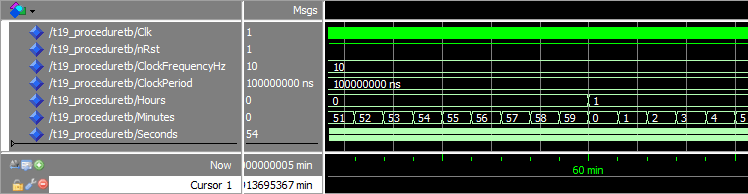
ModelSim 中的波形窗口,放大了 Minutes 所在的时间轴 信号正在包装:
分析
我们可以从波形中看到,信号的环绕仍然像在上一个教程中那样工作。那是因为我们实际上并没有改变模块上的功能,只是改变了它的实现方式。
IncrementWrap 参数列表中的第一项 程序是 Counter 信号。它使用方向 inout 声明 使程序能够读取和设置其值。
参数列表中的第二项和第三项是常量。这意味着您在此处输入的值将显示为常量inside 的程序。 WrapValue 与 Enable 一起输入 输入确定 Counter 信号增加或包装。
参数列表最后一项是方向为out的变量 .此输出的目的是通知调用者计数器包装的过程。我们在这里使用它有点像返回值。
在主进程中,我们对 IncrementWrap 进行了四次调用 程序。随后的每个调用都使用 Wrap 变量以启用计数。如果我们使用信号而不是变量,它就不会起作用,因为信号值仅在进程进入睡眠状态时更新。我们需要将一个过程调用的输出值用作下一行调用的输入。因此,它必须是一个变量。
外卖
- 程序可用作迷你模块以避免复制粘贴代码
- 过程的参数(输入/输出)可以是信号、变量或常量
- 与函数不同,过程可以包含等待语句
转到下一个教程 »
VHDL