


C++ 运算符重载完全指南:实战示例与最佳实践
C++ 运算符重载完全指南
本教程通过丰富示例,系统讲解 C++ 运算符重载的语法、一元/二元运算符重载技巧及工程实践注意事项。
在 C++ 中,我们可以改变运算符对用户自定义类型(如类对象、结构体)的行为,这被称为运算符重载。例如,
假设我们从 Complex 类创建了三个对象 c1、c2 和 result,用于表示复数。
通过运算符重载,我们可以重新定义 + 运算符,使其直接支持复数相加:
result = c1 + c2;而不必调用类似 result = c1.addNumbers(c2); 这样的成员函数。这让代码更直观、易读。
注意: 运算符重载不能用于基本数据类型(如 int、float、char 等)。
运算符重载语法
重载运算符需定义一个特殊的 operator 函数,置于希望重载运算符的类/结构体内部:
class ClassName {
    // ...
public:
    ReturnType operator Symbol(Arguments) {
        // 实现
    }
    // ...
};
其中:
ReturnType:函数返回类型operator:关键字Symbol:要重载的运算符符号(如+、<、-、++等)Arguments:函数参数列表
一元运算符重载
一元运算符仅作用于单个操作数。自增 ++ 和自减 -- 是典型的一元运算符。
示例 1:前缀 ++ 运算符重载
// 重载前缀 ++
#include <iostream>
using namespace std;

class Count {
private:
    int value;
public:
    // 构造函数初始化为 5
    Count() : value(5) {}
    // 重载前缀 ++
    void operator ++ () {
        ++value;
    }
    void display() {
        cout << "Count: " << value << endl;
    }
};

int main() {
    Count count1;
    // 调用 void operator ++ ()
    ++count1;
    count1.display();
    return 0;
}
输出
Count: 6
使用 ++count1 时,会调用 void operator ++ (),将对象 count1 的 value 增加 1。
注意: 重载运算符时,我们可以让其表现为任意行为(如让 ++ 增加 100),但这会让代码极难理解。程序员应确保重载行为符合直觉、保持一致性。
上例仅支持前缀形式。要支持后缀 ++,需使用以下语法:
void operator ++ (int) { // 代码 }参数列表中的 int 仅为标识后缀形式的约定标记,并非真实参数。
示例 2:同时重载前缀与后缀 ++
// 同时重载前缀和后缀 ++
#include <iostream>
using namespace std;

class Count {
private:
    int value;
public:
    Count() : value(5) {}
    // 前缀 ++
    void operator ++ () {
        ++value;
    }
    // 后缀 ++
    void operator ++ (int) {
        value++;
    }
    void display() {
        cout << "Count: " << value << endl;
    }
};

int main() {
    Count count1;
    // 调用后缀版本
    count1++;
    count1.display();
    // 调用前缀版本
    ++count1;
    count1.display();
    return 0;
}
输出
Count: 6
Count: 7
示例 2 同时支持前缀和后缀,但无法支持如下用法:
Count count1, result;
// 错误:返回类型为 void
result = ++count1;
解决方法是让运算符函数返回 Count 类型:
// 前缀返回 Count
Count operator ++ () { /* ... */ }
// 后缀返回 Count
Count operator ++ (int) { /* ... */ }
示例 3:运算符函数返回值(++ 运算符)
#include <iostream>
using namespace std;

class Count {
private:
    int value;
public:
    Count() : value(5) {}
    // 前缀 ++ 返回新对象
    Count operator ++ () {
        Count temp;
        temp.value = ++value;  // 先自增,再赋值给 temp
        return temp;
    }
    // 后缀 ++ 返回旧值副本
    Count operator ++ (int) {
        Count temp;
        temp.value = value++;  // 先赋值,再自增
        return temp;
    }
    void display() {
        cout << "Count: " << value << endl;
    }
};

int main() {
    Count count1, result;
    // 前缀:result 获取自增后的值
    result = ++count1;
    result.display();  // 6
    // 后缀:result 获取自增前的值
    result = count1++;
    result.display();  // 6
    return 0;
}
输出
Count: 6
Count: 6
前缀版本中 temp.value = ++value; 先增加 value(属于调用对象 count1),再赋值给临时对象 temp。后缀版本则先用旧值初始化 temp,再增加 value。
二元运算符重载
二元运算符作用于两个操作数,如 result = num + 9; 中的 +。
为用户自定义类型重载二元运算符时:
obj3 = obj1 + obj2;运算符函数由 obj1 调用,obj2 作为参数传入。
示例 4:二元运算符 + 重载(复数相加)
// 重载二元运算符 + 实现复数加法
#include <iostream>
using namespace std;

class Complex {
private:
    float real;   // 实部
    float imag;   // 虚部
public:
    Complex() : real(0), imag(0) {}
    void input() {
        cout << "Enter real and imaginary parts respectively: ";
        cin >> real >> imag;
    }
    // 重载 + 运算符
    Complex operator + (const Complex& obj) {
        Complex temp;
        temp.real = real + obj.real;
        temp.imag = imag + obj.imag;
        return temp;
    }
    void output() {
        if (imag < 0)
            cout << "Output Complex number: " << real << imag << "i";
        else
            cout << "Output Complex number: " << real << "+" << imag << "i";
    }
};

int main() {
    Complex complex1, complex2, result;
    cout << "Enter first complex number:\n";
    complex1.input();
    cout << "Enter second complex number:\n";
    complex2.input();
    // complex1 调用 operator+,complex2 作为参数
    result = complex1 + complex2;
    result.output();
    return 0;
}
输出
Enter first complex number:
Enter real and imaginary parts respectively: 9 5
Enter second complex number:
Enter real and imaginary parts respectively: 7 6
Output Complex number: 16+11i
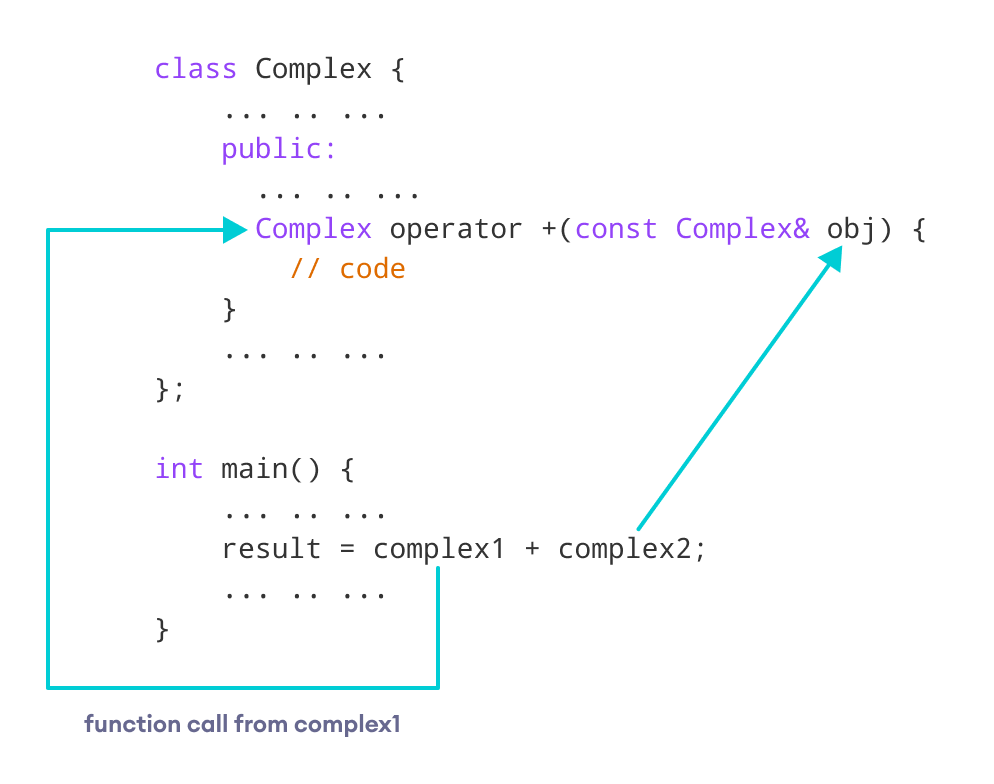
运算符函数签名为:
Complex operator + (const Complex& obj)也可写为 Complex operator + (Complex obj),但推荐使用 const Complex&:
- 引用(&):避免拷贝 complex2,提升效率。
- const:防止函数内部修改参数对象,符合只读语义,是良好实践。
C++ 运算符重载注意事项
=和&默认已重载。同类对象赋值可直接用=,无需自定义。- 运算符重载不能改变运算符的优先级和结合性。若需改变求值顺序,应使用括号。
- 有 4 个运算符无法重载:
::(作用域解析).(成员访问).*(成员指针访问)?:(三元条件运算符)
延伸阅读:
- 如何正确重载自增运算符?
- 如何重载二元
-实现复数减法?
C语言