


Python JSON:编码(转储)、解码(加载)和读取 JSON 文件
什么是 Python 中的 JSON?
JSON in Python 是一种受 JavaScript 启发的标准格式,用于通过网络以文本格式进行数据交换和数据传输。通常,JSON 是字符串或文本格式。它可以被 API 和数据库使用,并将对象表示为名称/值对。 JSON 代表 JavaScript Object Notation。
Python JSON 语法:
JSON 被写成键值对。
{
        "Key":  "Value",
        "Key":  "Value",
}
JSON 非常类似于 Python 字典。 Python 支持 JSON,它有一个内置的 JSON 库。
Python 中的 JSON 库
‘元帅 '和'泡菜' Python 的外部模块维护一个 JSON 版本 Python 库。在 Python 中使用 JSON 来执行 JSON 相关的操作,如编码和解码,您需要首先 import JSON 库以及您的 .py 中的那个 文件,
import json
JSON Python 模块中提供了以下方法
| 方法 | 说明 |
|---|---|
| 转储() | 编码为 JSON 对象 |
| 转储() | 编码字符串写入文件 |
| loads() | 解码 JSON 字符串 |
| 加载() | 读取 JSON 文件时解码 |
Python 转 JSON(编码)
Python 的 JSON 库默认执行以下 Python 对象到 JSON 对象的转换
| Python | JSON |
|---|---|
| 字典 | 对象 |
| 列表 | 数组 |
| unicode | 字符串 |
| 数字 - int, long | 数字 - 整数 |
| 浮点数 | 数字 - 实数 |
| 是的 | 是的 |
| 错误 | 错误 |
| 无 | 空 |
将 Python 数据转换为 JSON 称为编码操作。编码是在 JSON 库方法的帮助下完成的 - dumps()
Python 中的 JSON 转储()
json.dumps() 在 Python 中是一种将 Python 的字典对象转换为 JSON 字符串数据格式的方法。当对象需要以字符串格式进行解析、打印等操作时,它很有用。
现在让我们用 Python 执行我们的第一个 json.dumps 编码示例:
import json

x = {
  "name": "Ken",
  "age": 45,
  "married": True,
  "children": ("Alice","Bob"),
  "pets": ['Dog'],
  "cars": [
    {"model": "Audi A1", "mpg": 15.1},
    {"model": "Zeep Compass", "mpg": 18.1}
  ]
}
# sorting result in asscending order by keys:
sorted_string = json.dumps(x, indent=4, sort_keys=True)
print(sorted_string)
输出:
{"person": {"name": "Kenn", "sex": "male", "age": 28}})
让我们看一个 Python 将 JSON 写入文件的示例,用于使用相同的函数 dump() 创建字典的 JSON 文件
# here we create new data_file.json file with write mode using file i/o operation
with open('json_file.json', "w") as file_write:
# write json data into file
json.dump(person_data, file_write)
输出:
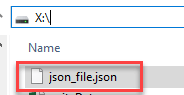
没什么可显示的……在您的系统中创建了 json_file.json。您可以检查该文件,如下面的将 JSON 写入文件 Python 示例所示。
JSON 到 Python(解码)
JSON 字符串解码是在内置方法 json.loads() 的帮助下完成的 &json.load() Python 中的 JSON 库。这里的转换表显示了 JSON 对象到 Python 对象的示例,这有助于在 Python 中执行 JSON 字符串的解码。
| JSON | Python |
|---|---|
| 对象 | 字典 |
| 数组 | 列表 |
| 字符串 | unicode |
| 数字 - 整数 | 数字 - int, long |
| 数字 - 实数 | 浮动 |
| 是的 | 是的 |
| 错误 | 错误 |
| 空 | 无 |
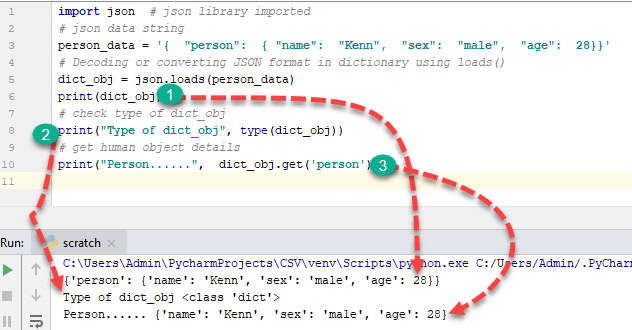
让我们看一个借助 json.loads 进行解码的基本解析 JSON Python 示例 功能,
import json  # json library imported
# json data string
person_data = '{  "person":  { "name":  "Kenn",  "sex":  "male",  "age":  28}}'
# Decoding or converting JSON format in dictionary using loads()
dict_obj = json.loads(person_data)
print(dict_obj)
# check type of dict_obj
print("Type of dict_obj", type(dict_obj))
# get human object details
print("Person......",  dict_obj.get('person'))
输出:
{'person': {'name': 'Kenn', 'sex': 'male', 'age': 28}}
Type of dict_obj <class 'dict'>
Person...... {'name': 'John', 'sex': 'male'}
在 Python 中解码 JSON 文件或解析 JSON 文件
现在,我们将通过 Python parse JSON example 学习如何在 Python 中读取 JSON 文件:
注意: 解码 JSON 文件是与文件输入/输出 (I/O) 相关的操作。 JSON 文件必须存在于您的系统中您在程序中提到的指定位置。
Python读取JSON文件示例:
import json
#File I/O Open function for read data from JSON File
with open('X:/json_file.json') as file_object:
        # store file data in object
        data = json.load(file_object)
print(data)
这里的数据 是Python的字典对象,如上面读取JSON文件的Python示例所示。
输出:
{'person': {'name': 'Kenn', 'sex': 'male', 'age': 28}} 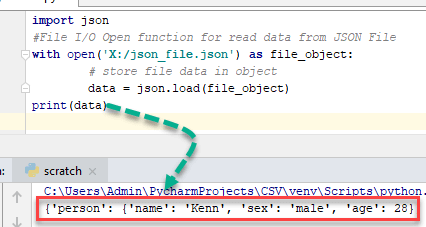
Python 中的紧凑编码
当您需要减小 JSON 文件的大小时,可以在 Python 中使用紧凑编码。
例如,
import json
# Create a List that contains dictionary
lst = ['a', 'b', 'c',{'4': 5, '6': 7}]
# separator used for compact representation of JSON.
# Use of ',' to identify list items
# Use of ':' to identify key and value in dictionary
compact_obj = json.dumps(lst, separators=(',', ':'))
print(compact_obj)
输出:
'["a", "b", "c", {"4": 5, "6": 7}]'

** Here output of JSON is represented in a single line which is the most compact representation by removing the space character from compact_obj **
格式化 JSON 代码(漂亮打印)
- 目的是编写格式良好的代码以供人类理解。借助漂亮的打印,任何人都可以轻松理解代码。
示例:
import json
dic = { 'a': 4, 'b': 5 }
''' To format the code use of indent and 4 shows number of space and use of separator is not necessary but standard way to write code of particular function. '''
formatted_obj = json.dumps(dic, indent=4, separators=(',', ': '))
print(formatted_obj)
输出:
{
   "a" : 4,
   "b" : 5
}
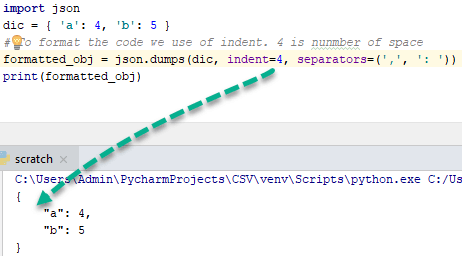
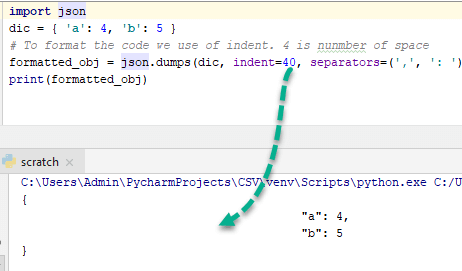
为了更好地理解这一点,将 indent 更改为 40 并观察输出-
订购 JSON 代码:
排序键 Python 转储函数参数中的属性将按升序对 JSON 中的键进行排序。 sort_keys 参数是一个布尔属性。当它是真的排序是允许的,否则不允许。让我们来了解一下 Python 字符串到 JSON 排序的例子。
例如,
import json

x = {
  "name": "Ken",
  "age": 45,
  "married": True,
  "children": ("Alice", "Bob"),
  "pets": [ 'Dog' ],
  "cars": [
    {"model": "Audi A1", "mpg": 15.1},
    {"model": "Zeep Compass", "mpg": 18.1}
  	],
}
# sorting result in asscending order by keys:
sorted_string = json.dumps(x, indent=4, sort_keys=True)
print(sorted_string)
输出:
{
    "age": 45,
    "cars": [ {
        "model": "Audi A1",
        "mpg": 15.1
    },
    {
        "model": "Zeep Compass",
        "mpg": 18.1
    }
    ],
    "children": [ "Alice",
		  "Bob"
	],
    "married": true,
    "name": "Ken",
    "pets": [
		"Dog"
	]
}
如您所见,钥匙的年龄、汽车、儿童等按升序排列。
Python 的复杂对象编码
一个 Complex 对象有两个不同的部分,分别是
- 实物部分
- 虚部
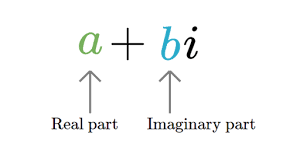
示例:3 +2i
在执行复杂对象的编码之前,您需要检查变量是否复杂。您需要创建一个函数,该函数使用实例方法检查存储在变量中的值。
让我们为检查对象是否复杂或是否适合编码创建特定的函数。
import json

# create function to check instance is complex or not
def complex_encode(object):
    # check using isinstance method
    if isinstance(object, complex):
        return [object.real, object.imag]
    # raised error using exception handling if object is not complex
    raise TypeError(repr(object) + " is not JSON serialized")


# perform json encoding by passing parameter
complex_obj = json.dumps(4 + 5j, default=complex_encode)
print(complex_obj)
输出:
'[4.0, 5.0]'
Python 中的复杂 JSON 对象解码
要解码 JSON 中的复杂对象,请使用 object_hook 参数检查 JSON 字符串是否包含复杂对象。让我们理解字符串到 JSON Python 示例,
import json
  # function check JSON string contains complex object
  def is_complex(objct):
    if '__complex__' in objct:
      return complex(objct['real'], objct['img'])
    return objct

  # use of json loads method with object_hook for check object complex or not
  complex_object =json.loads('{"__complex__": true, "real": 4, "img": 5}', object_hook = is_complex)
  #here we not passed complex object so it's convert into dictionary
  simple_object =json.loads('{"real": 6, "img": 7}', object_hook = is_complex)
  print("Complex_object......",complex_object)
  print("Without_complex_object......",simple_object)
输出:
Complex_object...... (4+5j)
Without_complex_object...... {'real': 6, 'img': 7}
JSON序列化类JSONEncoder概述
JSONEncoder 类用于在执行编码时对任何 Python 对象进行序列化。它包含三种不同的编码方法,分别是
- 默认(o) – 在子类中实现并为 o 返回序列化对象 对象。
- 编码(o) – 与 JSON 转储相同,Python 方法返回 Python 数据结构的 JSON 字符串。
- iterencode(o) – 一一表示字符串并编码对象o。
借助 JSONEncoder 类的 encode() 方法,我们还可以对任何 Python 对象进行编码,如下面的 Python JSON 编码器示例所示。
# import JSONEncoder class from json
from json.encoder import JSONEncoder
colour_dict = { "colour": ["red", "yellow", "green" ]}
# directly called encode method of JSON
JSONEncoder().encode(colour_dict)
输出:
'{"colour": ["red", "yellow", "green"]}' JSON反序列化类JSONDecoder概述
JSONDecoder 类用于在执行解码时对任何 Python 对象进行反序列化。它包含三种不同的解码方法,分别是
- 默认(o) – 在子类中实现并返回反序列化对象o 对象。
- 解码(o) – 与 json.loads() 方法相同,返回 JSON 字符串或数据的 Python 数据结构。
- raw_decode(o) - 一一表示Python字典并解码对象o。
借助 JSONDecoder 类的 decode() 方法,我们还可以对 JSON 字符串进行解码,如下 Python JSON 解码器示例所示。
import json
# import JSONDecoder class from json
from json.decoder import JSONDecoder
colour_string = '{ "colour": ["red", "yellow"]}'
# directly called decode method of JSON
JSONDecoder().decode(colour_string)
输出:
{'colour': ['red', 'yellow']} 从 URL 解码 JSON 数据:真实示例
我们将从指定的 URL(https://feeds.citibikenyc.com/stations/stations.json) 获取 CityBike NYC (Bike Sharing System) 的数据并转换成字典格式。
Python 从文件中加载 JSON 示例:
注意:- 确保你的 Python 中已经安装了 requests 库,如果没有,请打开终端或 CMD 并输入
- (适用于 Python 3 或更高版本)pip3 安装请求
import json
import requests

# get JSON string data from CityBike NYC using web requests library
json_response= requests.get("https://feeds.citibikenyc.com/stations/stations.json")
# check type of json_response object
print(type(json_response.text))
# load data in loads() function of json library
bike_dict = json.loads(json_response.text)
#check type of news_dict
print(type(bike_dict))
# now get stationBeanList key data from dict
print(bike_dict['stationBeanList'][0])
输出:
<class 'str'>
<class 'dict'>
{
	'id': 487,
 	'stationName': 'E 20 St & FDR Drive',
	'availableDocks': 24,
	'totalDocks': 34,
	'latitude': 40.73314259,
	'longitude': -73.97573881,
	'statusValue': 'In Service',
	'statusKey': 1,
	'availableBikes': 9,
	'stAddress1': 'E 20 St & FDR Drive',
	'stAddress2': '',
	'city': '',
	'postalCode': '',
	'location': '',
	'altitude': '',
	'testStation': False,
	'lastCommunicationTime': '2018-12-11 10:59:09 PM', 'landMark': ''
}
Python 中与 JSON 库相关的异常:
- 类 json.JSONDecoderError 处理与解码操作相关的异常。它是 ValueError 的子类。
- 异常 - json.JSONDecoderError(msg, doc)
- Exception的参数是,
- msg - 未格式化的错误消息
- doc – 解析的 JSON 文档
- pos – 文档失败时的起始索引
- lineno - line no 显示对应于 pos
- 冒号 - 没有对应于 pos 的列
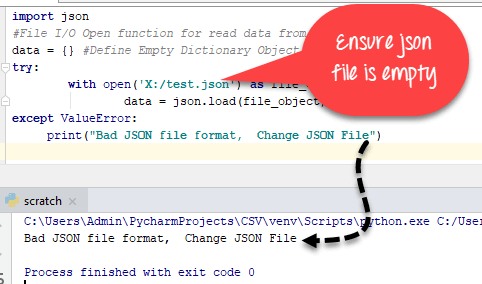
Python 从文件中加载 JSON 示例:
import json
#File I/O Open function for read data from JSON File
data = {} #Define Empty Dictionary Object
try:
        with open('json_file_name.json') as file_object:
                data = json.load(file_object)
except ValueError:
     print("Bad JSON file format,  Change JSON File")
Python 中的无限数和 NaN 数
JSON 数据交换格式(RFC – Request For Comments)不允许 Infinite 或 Nan Value,但 Python-JSON 库中没有限制执行 Infinite 和 Nan Value 相关操作。如果 JSON 获得 INFINITE 和 Nan 数据类型,则将其转换为文字。
例如,
import json
# pass float Infinite value
infinite_json = json.dumps(float('inf'))
# check infinite json type
print(infinite_json)
print(type(infinite_json))
json_nan = json.dumps(float('nan'))
print(json_nan)
# pass json_string as Infinity
infinite = json.loads('Infinity')
print(infinite)
# check type of Infinity
print(type(infinite))
输出:
Infinity
<class 'str'>
NaN
inf
<class 'float'>
JSON 字符串中的重复键
RFC 指定键名在 JSON 对象中应该是唯一的,但这不是强制性的。 Python JSON 库不会引发 JSON 中重复对象的异常。它忽略所有重复的键值对,只考虑其中最后一个键值对。
- 示例,
import json
repeat_pair = '{"a":  1, "a":  2, "a":  3}'
json.loads(repeat_pair)
输出:
{'a': 3} 在 Python 中使用 JSON 的 CLI(命令行界面)
json.tool 提供命令行界面来验证 JSON 漂亮打印语法。让我们看一个 CLI 的例子

$ echo '{"name" : "Kings Authur" }' | python3 -m json.tool 输出:
{
    "name": " Kings Authur "
}
JSON 在 Python 中的优势
- 易于在容器和值之间移动(JSON 到 Python 和 Python 到 JSON)
- 人类可读(漂亮打印)JSON 对象
- 广泛用于数据处理。
- 在单个文件中没有相同的数据结构。
JSON 在 Python 中的实现限制
- 在 JSON 范围的反序列化器和数字预测中
- JSON 字符串和 JSON 数组的最大长度以及对象的嵌套级别。
Python JSON 备忘单
| Python JSON 函数 | 说明 |
|---|---|
| json.dumps(person_data) | 创建 JSON 对象 |
| json.dump(person_data, file_write) | 使用 Python 的 File I/O 创建 JSON 文件 |
| compact_obj =json.dumps(data, separators=(',',':')) | 通过使用分隔符从 JSON 对象中删除空格字符来压缩 JSON 对象 |
| formatted_obj =json.dumps(dic, indent=4, separators=(',', ':')) | 使用缩进格式化 JSON 代码 |
| sorted_string =json.dumps(x, indent=4, sort_keys=True) | 按字母顺序对 JSON 对象键进行排序 |
| complex_obj =json.dumps(4 + 5j, default=complex_encode) | JSON 中的 Python 复杂对象编码 |
| JSONEncoder().encode(color_dict) | 使用 JSONEncoder 类进行序列化 |
| json.loads(data_string) | 使用 json.loads() 函数解码 Python 字典中的 JSON 字符串 |
| json.loads(‘{“__complex__”:true, “real”:4, “img”:5}’, object_hook =is_complex) | 将复杂的 JSON 对象解码为 Python |
| JSONDecoder().decode(color_string) | 使用反序列化将 JSON 解码为 Python |
Python