


PLCnext 集群管理:利用 Kubernetes 赋能工业自动化
作为 IT 领域多年标准,在工业界尚未产生大影响。常被视为过于复杂和不必要。问题在于:它们能带来优势吗?
以 Kubernetes 为例展望 PLCnext 的愿景。
Kubernetes
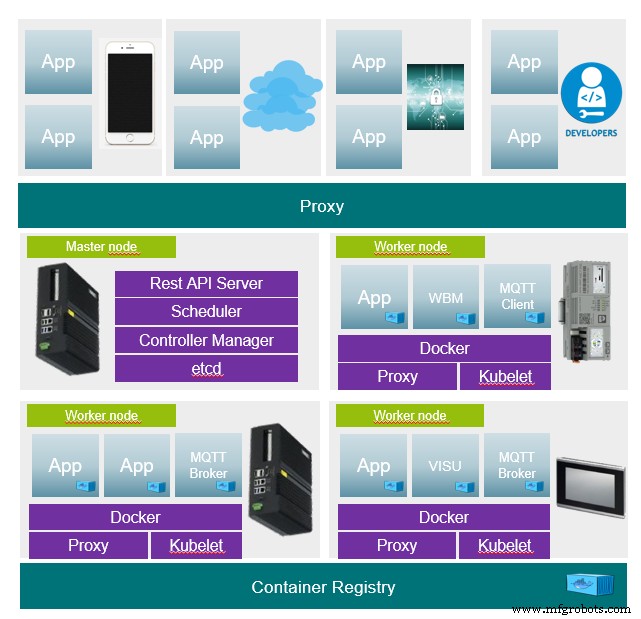
Kubernetes 是编排器(管理系统、主节点),除其他外利用容器在各设备间形成网络。系统以略微不同方式提供应用。
传统方式应用分发维护在设备上。知晓应用运行在哪台计算机。若应用需在另一计算机运行须人工操作。若一台计算机故障,其所有应用不可用。
使用 Kubernetes,向主节点给出应用状态描述,主节点处理其余。确保始终维持请求状态。但不知应用当前运行在哪节点,原则上仍可访问。
问答
什么是状态描述
- 状态描述是每个应用基础。含如用哪容器哪版本、应用是否为负载均衡多实例启动等。完全以文本形式写为
json或yaml文件。因此完全可版本化 (如 Git 或 SVN)。
如何安装集群
- 参与者 (主节点和节点) 需提供两软件组件 (容器运行时和 Kubernetes)。之后仅需通过 token 登录主节点一次。其余由主节点完成。
如何更新应用
- 更新即用新状态描述替换应用旧描述。更新即时进行,即新应用先安装启动,最后一刻关闭旧应用。若更新失败可回滚恢复旧状态。编排器保留所有旧状态。另有所述状态描述版本化可能性。
- 由此产生新更新场景。若应用在集群频繁运行,可先更新部分应用。测试数天或数周无错误后再更新其余。
节点故障会怎样
- 若任何节点故障,所有应用简单在另一节点可用。可访问性不变。只要算力足够,所有应用可继续运行。MQTT 服务器作为中心组件故障时常引发大问题,但在集群中不是问题。
主节点故障会怎样
- 主节点也可冗余运行,一旦故障另一节点可接管。
某些应用需在特定节点运行因需硬件访问
- 可在状态描述中包含此要求。状态也可基于设备标签分配。例:每个 AXCF2152 必须运行特定应用。再提 MQTT 例,MQTT 服务器运行在联邦中,此外每节点可装备 MQTT 客户端建立到 MQTT 服务器通信。主节点仅一,客户端运行在每节点。

示例
由三容器 (frontend、backend、database) 组成应用的状态描述示例。
Deployment:
- 定义容器所有必要设置。
Service:
- 在集群中心创建应用接口。无论部署在哪节点接口始终有效。
Ingress:
- 用 DNS 条目将接口链接到 frontend。使 frontend 始终在一个域名可达。
- Proxy https://MyApp.MyDomain.de/ 到 frontend service (Port 80)
- Proxy https://MyApp.MyDomain.de/api 到 backend service (port 3000)
# Kind of the Deployment kind: Deployment apiVersion: apps/v1 metadata: name: MyApplicationName labels: app: MyApplication MyApplication: MyApplicationName namespace: default ## Container specs spec: containers: ## Container spec for Frontend ## Name for the Container - name: MyContainer-frontend ## Container Image to use image: MyApplicationImage_frontend ## Ports for the frontend, http ports: - containerPort: 80 ## Container spec for Backend - name: MyContainerName-backend image: MyApplicationImage_backend ports: - containerPort: 3000 ## Container spec for mongodb - name: MyContainerName-mongo image: mongo:3.4 ## Startup commands for Mongo DB command: - "mongod" - "--bind_ip" - "0.0.0.0" ports: - containerPort: 27017 --- ## Service declaration, expose Ports to the kubernetes api (only internal rechable) apiVersion: v1 kind: Service metadata: name: MyApplicationName spec: ports: - name: frontend targetPort: 80 port: 80 - name: backend targetPort: 3000 port: 3000 selector: app: MyApplication task: MyApplicationName --- ## Ingress declaration, bind proxy to fronted and backend apiVersion: networking.k8s.io/v1beta1 kind: Ingress ## Bind ingress to traefik service proxy metadata: name:MyApplicationName annotations: kubernetes.io/ingress.class: traefik ## Ingress class for frontend, map dns ingress to service port 80 spec: rules: - host: MyApp.Mydomain.de http: paths: - path: / backend: serviceName:MyApplicationName servicePort: frontend ## Ingress class for backend, map dns ingress to service port 3000 - host: MyApplicationName.MyDomain.de http: paths: - path: /api backend: serviceName:MyApplicationName servicePort: backend
了解更多
https://kubernetes.io/docs/setup/production-environment/tools/kubeadm/create-cluster-kubeadm/
https://github.com/k3s-io/k3s
https://github.com/rancher/k3d
https://github.com/inercia/k3x
工业技术
- 冲压工艺全解析:类型、流程与工业应用
- 摩擦焊详解:原理、工艺分类与工业应用全景
- 热喷涂技术详解:工艺分类、应用场景与核心优势
- 水玻璃在铸造生产中的增效提质应用技术全解析
- 用Linux终端命令在PLCnext Control上快速配置VLAN
- 在PLCnext设备上用grpcurl安全远程访问gRPC
- PLCnext CLI 模板:简化 C++ 开发流程
- 安全访问通过 DHCP 获取 IP 的 PLCnext Web 服务器
- 开发 PLCnext 控制台应用 (C#):初学者指南
- 基于 Tableau 打造 PLCnext 实时监控仪表板
- 从 PLCnext 云数据创建 Power BI 仪表板
- 在 Azure IoT Hub 中为 PLCnext Control 构建实时 Grafana 仪表板