


如何在 VHDL 中使用 Case-When 语句
Case-When 语句将导致程序根据信号、变量或表达式的值从多个不同路径中取一个。它是具有多个 Elsif 的 If-Then-Elsif-Else 语句的更优雅的替代方案。
其他编程语言也有类似的结构,使用诸如 switch 之类的关键字 , 案例 ,或选择 .除此之外,Case-When 语句通常用于在 VHDL 中实现多路复用器。继续阅读,或观看视频了解如何操作!
这篇博文是基本 VHDL 教程系列的一部分。
Case-When 语句的基本语法是:case <expression> is
when <choice> =>
code for this branch
when <choice> =>
code for this branch
...
end case;
<expression> 通常是变量或信号。 Case语句可能包含多个when 选项,但只会选择一个选项。
<choice> 可能是像 "11" 这样的唯一值 :when "11" =>
或者它可以是像 5 to 10 这样的范围 :when 5 to 10 =>
它可以包含多个值,例如 1|3|5 :when 1|3|5 =>
最重要的是,others 选择。只要没有其他选择匹配,就会选择它:when others =>
others 选择相当于 Else If-Then-Elsif-Else 语句中的分支。
运动
在本视频教程中,我们将学习如何使用 VHDL 中的 Case-When 语句创建多路复用器:
我们在本教程中创建的最终代码:
library ieee;
use ieee.std_logic_1164.all;
use ieee.numeric_std.all;

entity T14_CaseWhenTb is
end entity;

architecture sim of T14_CaseWhenTb is

    signal Sig1 : unsigned(7 downto 0) := x"AA";
    signal Sig2 : unsigned(7 downto 0) := x"BB";
    signal Sig3 : unsigned(7 downto 0) := x"CC";
    signal Sig4 : unsigned(7 downto 0) := x"DD";

    signal Sel : unsigned(1 downto 0) := (others => '0');

    signal Output1 : unsigned(7 downto 0);
    signal Output2 : unsigned(7 downto 0);

begin

    -- Stimuli for the selector signal
    process is
    begin
        wait for 10 ns;
        Sel <= Sel + 1;
        wait for 10 ns;
        Sel <= Sel + 1;
        wait for 10 ns;
        Sel <= Sel + 1;
        wait for 10 ns;
        Sel <= Sel + 1;
        wait for 10 ns;
        Sel <= "UU";
        wait;
    end process;

    -- MUX using if-then-else
    process(Sel, Sig1, Sig2, Sig3, Sig4) is
    begin

        if Sel = "00" then
            Output1 <= Sig1;
        elsif Sel = "01" then
            Output1 <= Sig2;
        elsif Sel = "10" then
            Output1 <= Sig3;
        elsif Sel = "11" then
            Output1 <= Sig4;
        else -- 'U', 'X', '-' etc.
            Output1 <= (others => 'X');
        end if;

    end process;

    -- Equivalent MUX using a case statement
    process(Sel, Sig1, Sig2, Sig3, Sig4) is
    begin

        case Sel is
            when "00" =>
                Output2 <= Sig1;
            when "01" =>
                Output2 <= Sig2;
            when "10" =>
                Output2 <= Sig3;
            when "11" =>
                Output2 <= Sig4;
            when others => -- 'U', 'X', '-', etc.
                Output2 <= (others => 'X');
        end case;

    end process;

end architecture;
我们按下运行后 ModelSim 中的波形窗口,并在时间轴上放大: 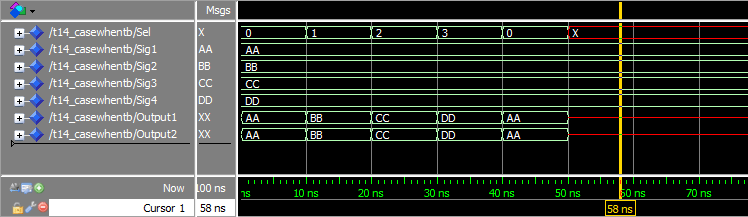
当我们在 ModelSim 中按下运行按钮时,模拟器控制台的输出:
VSIM 2> run
# ** Warning: NUMERIC_STD."=": metavalue detected, returning FALSE
#    Time: 50 ns  Iteration: 1  Instance: /t14_casewhentb
# ** Warning: NUMERIC_STD."=": metavalue detected, returning FALSE
#    Time: 50 ns  Iteration: 1  Instance: /t14_casewhentb
# ** Warning: NUMERIC_STD."=": metavalue detected, returning FALSE
#    Time: 50 ns  Iteration: 1  Instance: /t14_casewhentb
# ** Warning: NUMERIC_STD."=": metavalue detected, returning FALSE
#    Time: 50 ns  Iteration: 1  Instance: /t14_casewhentb
分析
首先,我们使用 If-Then-Elsif-Else 创建了一个进程,该进程将转发其中一个信号 Sig1 , Sig2 , Sig3 , 或 Sig4 ,基于选择器信号 Sel 的值 .
然后我们使用 Case-When 语句创建了一个完全相同的流程。从波形中我们可以看出两个进程的输出信号,Output1 和 Output2 , 行为完全相同。
在我们的示例中,Sel 信号只有四个合法值。但是如果有更多的可能性,我们可以很容易地看到 Case-When 语句可以帮助使代码更具可读性。这是大多数 VHDL 设计人员创建此类组件的首选方式。
了解多路复用器 是这个练习的奖励点。多路复用器,或简称 MUX,是数字设计中的核心组件。它只是一个开关,可以选择多个输入中的一个,并将其转发到输出。
这是我们的 MUX 如何转发所选输入信号的说明:
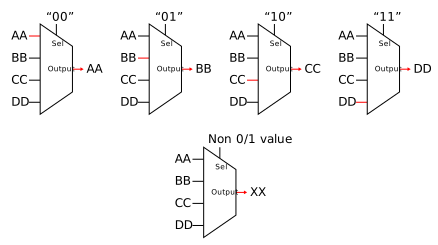
我们使用了 others 捕获 Sel 的所有值的子句 这不是一或零。正如我们在 std_logic 教程中了解到的,这些信号可以有许多不是 '0' 的值 或 '1' .通过输出 'X' 来处理这些值是一种很好的设计实践 .这表示该信号上的未知值,并且在下游逻辑中也是可见的。
从波形中我们可以看出,当Sel 信号变红,Output1 和 Output2 也改为"XX" .这是 when others => 在行动中。
此外,由于 Sel,ModelSim 中的控制台输出显示警告 信号设置为 "UU" . “** Warning:NUMERIC_STD.”=”:metavalue detected, returned FALSE”消息出现在 50 ns 仿真时间,这正是信号变为红色的时间。
外卖
- 可以使用 Case-When 代替多个 If-Then-Elsif 语句
when others =>可用于实现默认选择- 最好使用 Case-When 语句创建多路复用器
转到下一个教程 »
VHDL