


DIY三轴CNC立式加工中心:打造精密铣床
组件与物料
 | Arduino Nano R3 | × | 1 |
 | Raspberry Pi 3 Model B | × | 1 |
 | SparkFun Stepper motor driver board A4988 | × | 1 |
| Adafruit Arduino Nano 4-stepper 1-DC RepRap shield | × | 1 | |
 | OpenBuilds Aluminum Spacers | × | 1 |
| 电源 12V/5A | × | 1 | |
 | OpenBuilds L Bracket | × | 1 |
 | OpenBuilds M5 Tee Nuts (10 Pack) | × | 1 |
 | OpenBuilds Low Profile Screws M5 (10 Pack) | × | 1 |
 | OpenBuilds M3 Cap Head Screws | × | 1 |
 | OpenBuilds Set Screw | × | 1 |
 | OpenBuilds Slot Washer - 15x5x2mm | × | 1 |
 | OpenBuilds Anti-Backlash Nut Block for 8mm Metric Acme Lead Screw | × | 1 |
 | OpenBuilds Threaded Rod Plate - NEMA 17 Stepper Motor | × | 1 |
 | OpenBuilds 8mm Metric Acme Lead Screw | × | 1 |
| OpenBuilds Anti-Backlash Nut Block for 8mm Metric Acme Lead Screw | × | 1 |
 | OpenBuilds Ball Bearing – 625 2RS 5x16x5 | × | 1 |
| 光轴 | × | 1 | |
| BLDC 散热风扇 | × | 1 | |
| 直流电机 (通用) | × | 1 | |
| 舵机 (Tower Pro MG996R) | × | 1 | |
 | Texas Instruments Dual H-Bridge motor drivers L293D | × | 1 |
所需工具与设备
| 螺丝刀 | |
| 电钻 | |
| Dremel / 旋转切割工具 | |
| 热熔胶枪 | |
 | 电烙铁 (通用) |
| 角磨机 |
应用与在线服务
| Linux | |
| ArtCAM | |
| GRBL 0.9 | |
 | Autodesk Fusion 360 |
 | Arduino IDE |
 | Google Android Things |
| VNC |
项目介绍
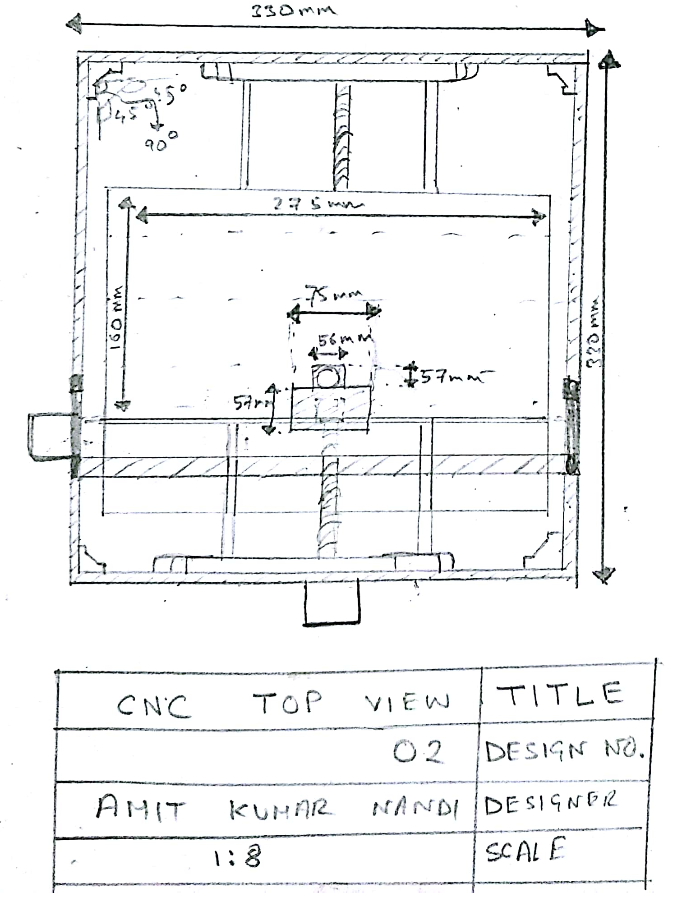
我们的原型机采用物联网架构,可通过互联网从几乎任何地方远程控制。这是一台 350mm × 350mm 的 CNC,工作区域 250mm × 240mm,运行开源运动控制软件 GRBL。硬件也多为开源设计,大幅降低成本。整机采用本地采购零件组装,可加工木材、塑料、硬质橡胶、硬质树脂等材料,主要目标是低成本 PCB 制造,也可用于木雕。
未来计划增加激光加工支持。
目前系统可在本地局域网无线控制,计划进一步扩展为分布式 Web 应用,连接多台设备形成生态系统,可能性无限。
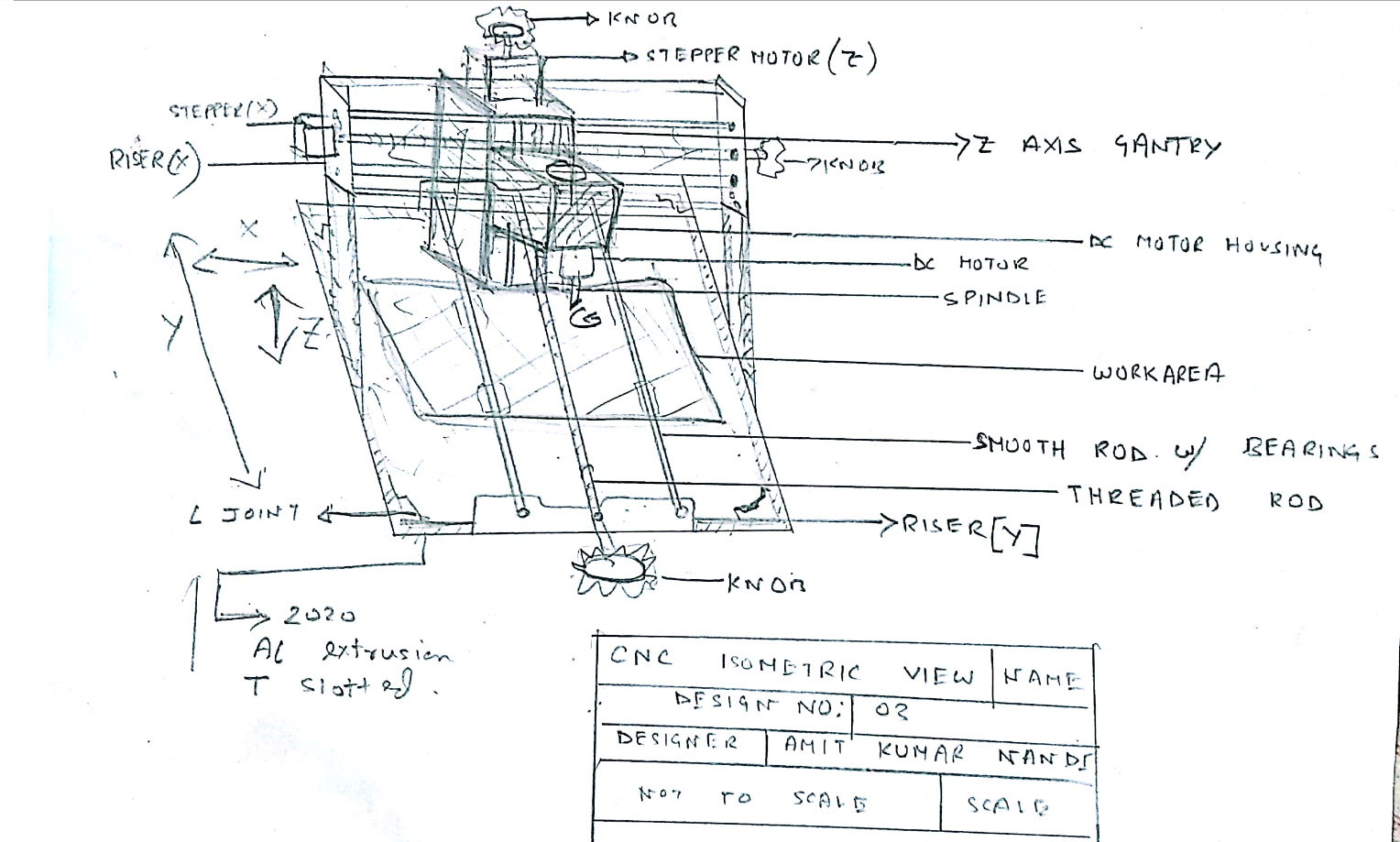
原型机底座采用 2020 T 型槽铝型材和 L 型接头组装。主轴为 2000 rpm 直流电机,功率约 80-85 瓦。三轴均采用丝杠和光轴配合带有径向卡簧的滚珠轴承,保证运行平滑。最小导程 0.8mm/转,配合 2000 步/转,三轴分辨率均为 1600。机身尺寸约 430×430×330mm,工作区域约 270×170×65mm,定位精度 0.04mm。Z 轴龙门架为 3D 打印件,双光轴导向,行程 4.8cm(含主轴刀具)。使用 45° V 形刀进行 PCB 雕刻,也支持 0.2mm 至 1.8mm 平底铣刀。三轴主驱动均为 NEMA 23 步进电机,最大电流 3A,配合 2.5A A4988 驱动器,1/16 细分,以极低成本实现高精度加工。
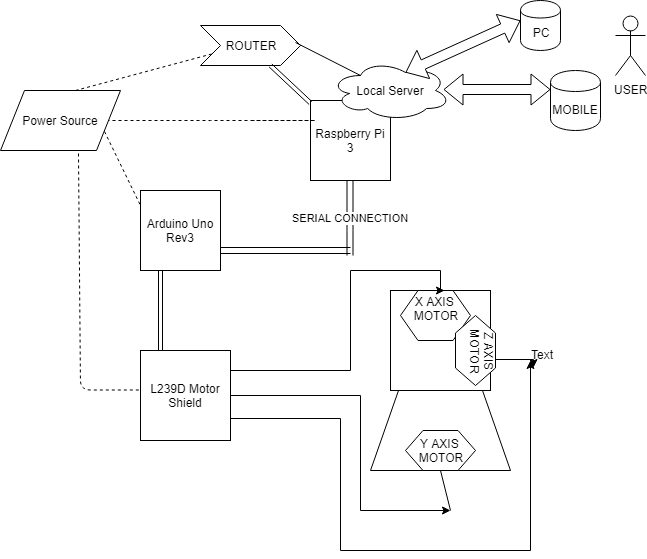
物联网部分:通过树莓派和路由器(安全隔离)连接互联网,运行 Web 服务器提供无线控制界面,可从手机/平板(作为 HMI)远程操控。还计划采集电机扭矩、电流、振动、噪声等实时数据,在 Web 平台展示分析,实现制造业所谓的工业物联网(Industry 4.0)。
代码
示例 G-code VHDL
(Scribbled version of C:\Users\ABDERR~1\AppData\Local\Temp\ink_ext_XXXXXX.svgISF45X @ 3000.00)
( unicorn.py --tab="plotter_setup" --pen-up-angle=50 --pen-down-angle=30 --start-delay=160 --stop-delay=150 --xy-feedrate=3000 --z-feedrate=150 --z-height=0 --finished-height=0 --register-pen=true --x-home=0 --y-home=0 --num-copies=1 --continuous=false --pause-on-layer-change=true C:\Users\ABDERR~1\AppData\Local\Temp\ink_ext_XXXXXX.svgISF45X )
G21 (metric ftw)
G90 (absolute mode)
G92 X0.00 Y0.00 Z0.00 (you are here)
M300 S30 (pen down)
G4 P160 (wait 160ms)
M300 S50 (pen up)
G4 P150 (wait 150ms)
M18 (disengage drives)
M01 (Was registration test successful?)
M17 (engage drives if YES, and continue)
M01 (Plotting layer 'Calque 1')
(Polyline consisting of 29 segments.)
G1 X16.85 Y4.97 F3000.00
M300 S30.00 (pen down)
G4 P160 (wait 160ms)
G1 X14.07 Y5.98 F3000.00
G1 X13.33 Y6.40 F3000.00
... (文件过长已截断,请下载查看完整内容)
步进电机代码 Arduino
//AMIT
#include <Servo.h>
#include <AFMotor.h>
#define LINE_BUFFER_LENGTH 512
char STEP = MICROSTEP;
const int penZUp = 115;
const int penZDown = 83;
const int penServoPin = 10;
const int stepsPerRevolution = 48;

Servo penServo;
AF_Stepper myStepperY(stepsPerRevolution, 1);
AF_Stepper myStepperX(stepsPerRevolution, 2);

struct point { float x; float y; float z; };
struct point actuatorPos;

float StepInc = 1;
int StepDelay = 0;
int LineDelay = 0;
int penDelay = 50;
float StepsPerMillimeterX = 100.0;
float StepsPerMillimeterY = 100.0;
float Xmin = 0, Xmax = 40, Ymin = 0, Ymax = 40, Zmin = 0, Zmax = 1;
float Xpos = Xmin, Ypos = Ymin, Zpos = Zmax;
boolean verbose = false;

void setup() {
  Serial.begin(9600);
  penServo.attach(penServoPin);
  penServo.write(penZUp);
  delay(100);
  myStepperX.setSpeed(600);
  myStepperY.setSpeed(600);
  Serial.println("Mini CNC Plotter alive and kicking!");
  Serial.print("X range is from "); Serial.print(Xmin); Serial.print(" to "); Serial.print(Xmax); Serial.println(" mm.");
  Serial.print("Y range is from "); Serial.print(Ymin); Serial.print(" to "); Serial.print(Ymax); Serial.println(" mm.");
}

void loop() {
  delay(100);
  char line[LINE_BUFFER_LENGTH];
  char c;
  int lineIndex;
  bool lineIsComment, lineSemiColon;
  lineIndex = 0; lineSemiColon = false; lineIsComment = false;
  while (1) {
    while (Serial.available() > 0) {
      c = Serial.read();
      if ((c == '\n') || (c == '\r')) {
        if (lineIndex > 0) {
          line[lineIndex] = '\0';
          if (verbose) { Serial.print("Received : "); Serial.println(line); }
          processIncomingLine(line, lineIndex);
          lineIndex = 0;
        } else { /* Empty or comment line */ }
        lineIsComment = false; lineSemiColon = false;
        Serial.println("ok");
      } else {
        if (lineIsComment || lineSemiColon) {
          if (c == ')') lineIsComment = false;
        } else {
          if (c <= ' ') { /* Throw away whitespace */ }
          else if (c == '/') { /* Block delete not supported */ }
          else if (c == '(') { lineIsComment = true; }
          else if (c == ';') { lineSemiColon = true; }
          else if (lineIndex >= LINE_BUFFER_LENGTH-1) {
            Serial.println("ERROR - lineBuffer overflow");
            lineIsComment = false; lineSemiColon = false;
          }
          else if (c >= 'a' && c <= 'z') { line[lineIndex++] = c - 'a' + 'A'; }
          else { line[lineIndex++] = c; }
        }
      }
    }
  }
}

void processIncomingLine(char* line, int charNB) {
  int currentIndex = 0;
  char buffer[64];
  struct point newPos; newPos.x = 0.0; newPos.y = 0.0;
  while (currentIndex < charNB) {
    switch (line[currentIndex++]) {
      case 'U': penUp(); break;
      case 'D': penDown(); break;
      case 'G':
        buffer[0] = line[currentIndex++];
        buffer[1] = '\0';
        switch (atoi(buffer)) {
          case 0: case 1: // G00 & G01
            char* indexX = strchr(line+currentIndex, 'X');
            char* indexY = strchr(line+currentIndex, 'Y');
            if (indexY <= 0) { newPos.x = atof(indexX + 1); newPos.y = actuatorPos.y; }
            else if (indexX <= 0) { newPos.y = atof(indexY + 1); newPos.x = actuatorPos.x; }
            else { newPos.y = atof(indexY + 1); indexY[0] = '\0'; newPos.x = atof(indexX + 1); }
            drawLine(newPos.x, newPos.y);
            actuatorPos.x = newPos.x; actuatorPos.y = newPos.y;
            break;
        }
        break;
      case 'M':
        buffer[0] = line[currentIndex++];
        buffer[1] = line[currentIndex++];
        buffer[2] = line[currentIndex++];
        buffer[3] = '\0';
        switch (atoi(buffer)) {
          case 300:
            char* indexS = strchr(line+currentIndex, 'S');
            float Spos = atof(indexS + 1);
            if (Spos == 30) penDown();
            if (Spos == 50) penUp();
            break;
          case 114: // M114
            Serial.print("Absolute position : X = "); Serial.print(actuatorPos.x);
            Serial.print(" - Y = "); Serial.println(actuatorPos.y);
            break;
          default:
            Serial.print("Command not recognized : M"); Serial.println(buffer);
        }
        break;
    }
  }
}

void drawLine(float x1, float y1) {
  if (verbose) { Serial.print("fx1, fy1: "); Serial.print(x1); Serial.print(","); Serial.print(y1); Serial.println(""); }
  if (x1 >= Xmax) x1 = Xmax; if (x1 <= Xmin) x1 = Xmin;
  if (y1 >= Ymax) y1 = Ymax; if (y1 <= Ymin) y1 = Ymin;
  if (verbose) { Serial.print("Xpos, Ypos: "); Serial.print(Xpos); Serial.print(","); Serial.print(Ypos); Serial.println(""); }
  if (verbose) { Serial.print("x1, y1: "); Serial.print(x1); Serial.print(","); Serial.print(y1); Serial.println(""); }
  x1 = (int)(x1 * StepsPerMillimeterX);
  y1 = (int)(y1 * StepsPerMillimeterY);
  float x0 = Xpos, y0 = Ypos;
  long dx = abs(x1 - x0), dy = abs(y1 - y0);
  int sx = x0 < x1 ? StepInc : -StepInc;
  int sy = y0 < y1 ? StepInc : -StepInc;
  long i, over = 0;
  if (dx > dy) {
    for (i=0; i= dx) { over -= dx; myStepperY.onestep(sy, STEP); }
      delay(StepDelay);
    }
  } else {
    for (i=0; i= dy) { over -= dy; myStepperX.onestep(sx, STEP); }
      delay(StepDelay);
    }
  }
  if (verbose) { Serial.print("dx, dy:"); Serial.print(dx); Serial.print(","); Serial.print(dy); Serial.println(""); }
  if (verbose) { Serial.print("Going to ("); Serial.print(x0); Serial.print(","); Serial.print(y0); Serial.println(")"); }
  delay(LineDelay);
  Xpos = x1; Ypos = y1;
}

void penUp() {
  penServo.write(penZUp); delay(penDelay); Zpos = Zmax;
  digitalWrite(15, LOW); digitalWrite(16, HIGH);
  if (verbose) Serial.println("Pen up!");
}
void penDown() {
  penServo.write(penZDown); delay(penDelay); Zpos = Zmin;
  digitalWrite(15, HIGH); digitalWrite(16, LOW);
  if (verbose) Serial.println("Pen down.");
}
Adafruit 电机驱动库 Arduino
// Adafruit Motor shield library
// copyright Adafruit Industries LLC, 2009
// this code is public domain, enjoy!
#if (ARDUINO >= 100)
#include "Arduino.h"
#else
#if defined(__AVR__)
#include
#endif
#include "WProgram.h"
#endif
#include "AFMotor.h"
static uint8_t latch_state;
#if (MICROSTEPS == 8)
uint8_t microstepcurve[] = {0, 50, 98, 142, 180, 212, 236, 250, 255};
#elif (MICROSTEPS == 16)
uint8_t microstepcurve[] = {0, 25, 50, 74, 98, 120, 141, 162, 180, 197, 212, 225, 236, 244, 250, 253, 255};
#endif
// ... (库代码过长,此处省略,完整代码请参考原文件)
自定义零件与外壳
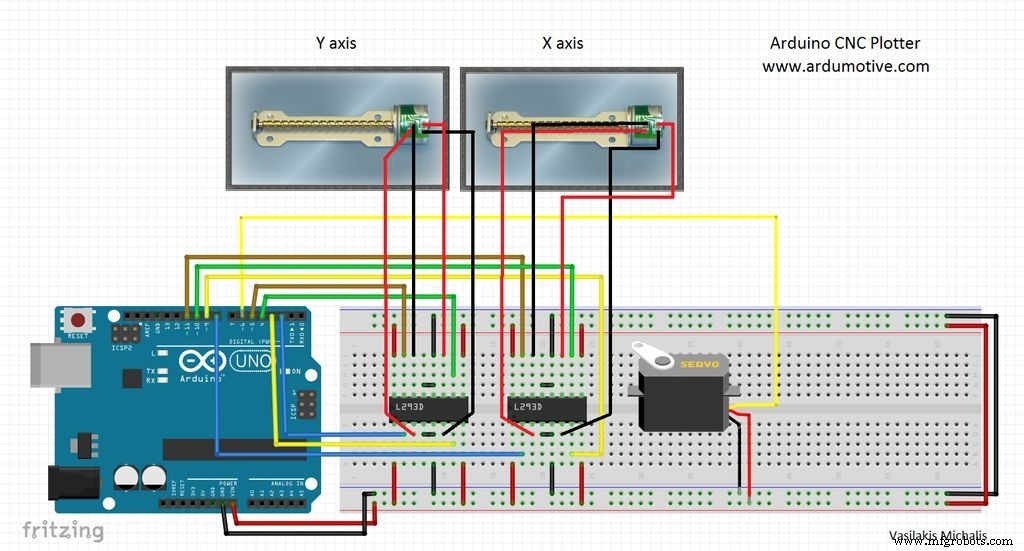
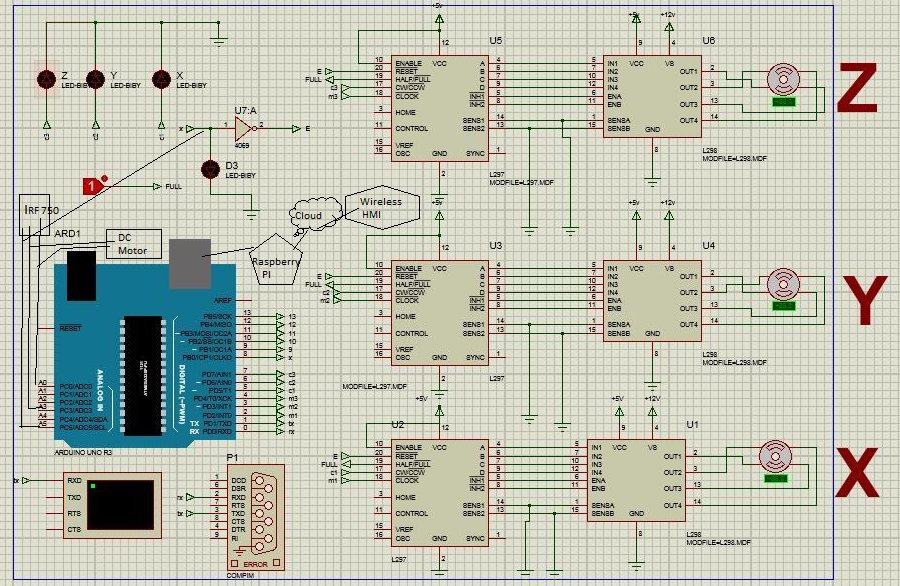
cnc_contour_SNa09InGkY.gm1 cnc_coppertop_PIxEVyoMWI.gtl原理图
制造工艺
- 自制LUMAZOID:基于Arduino的音乐可视化灯光控制器
- Arduino 与智能手机打造智能电压表——简单易做的 DIY 项目
- DIY VR 滑板:用 Arduino、Google Cardboard 与蓝牙打造虚拟滑雪体验
- 三合一升级版 CNC 雕刻机:无刷电机主轴 + 激光 + 绘图笔
- 禅意花园 CNC 智能边桌:打造属于你的智能家具
- DIY Arduino 电子波疗设备 - 基于拉德尼克疗法的 EMR 治疗仪
- 利用 Arduino Nano R3 自制全功能 CNC 雕刻机
- DIY二自由度竞速模拟器:Arduino Nano驱动SG90微型舵机
- 自制通用 CNC 机器完整指南 — 可切换激光/铣削/绘图多功能头
- 使用 Arduino 制作便携式 RFID 门锁——分步指南
- 立式加工中心(VMC)与CNC立铣全面入门指南
- 迷你VMC详解:小型项目的紧凑型CNC铣削方案