


Arduino Nano 实现 DS3231 RTC 与 GPS 同步精准计时
元器件与材料
- Arduino Nano R3 ×1
- DS3231 时钟模块 ×1
- NEO-6M GPS 模块 ×1
- 双向电平转换模块 ×1
- 1602 LCD 显示屏 ×1
- I2C LCD 适配板 ×1
- 15Pin/6Pin/4Pin/5Pin 排针座若干
- 4Pin 排针 ×1
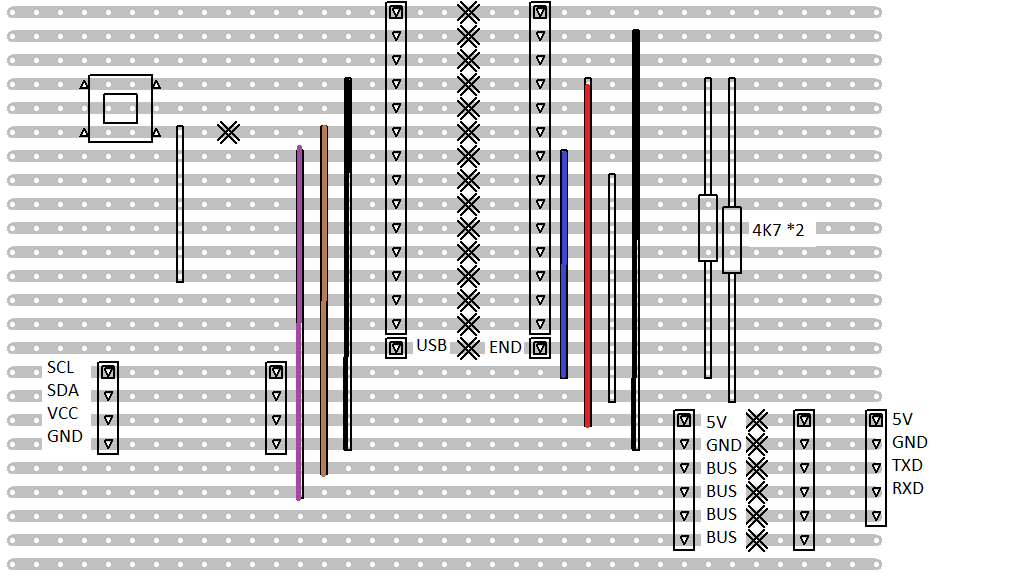
- 24×37 孔洞板 ×1
- 4.7kΩ 电阻 ×2
- 自锁按钮 ×1
项目简介
我的 DS3231 有走时偏差,原用电脑编译上传时间校准,但编译上传过程常被打断导致不准。发现 GPS 输出精准 UTC 时间后,决定用 GPS 对 DS3231 校时。
电路连接
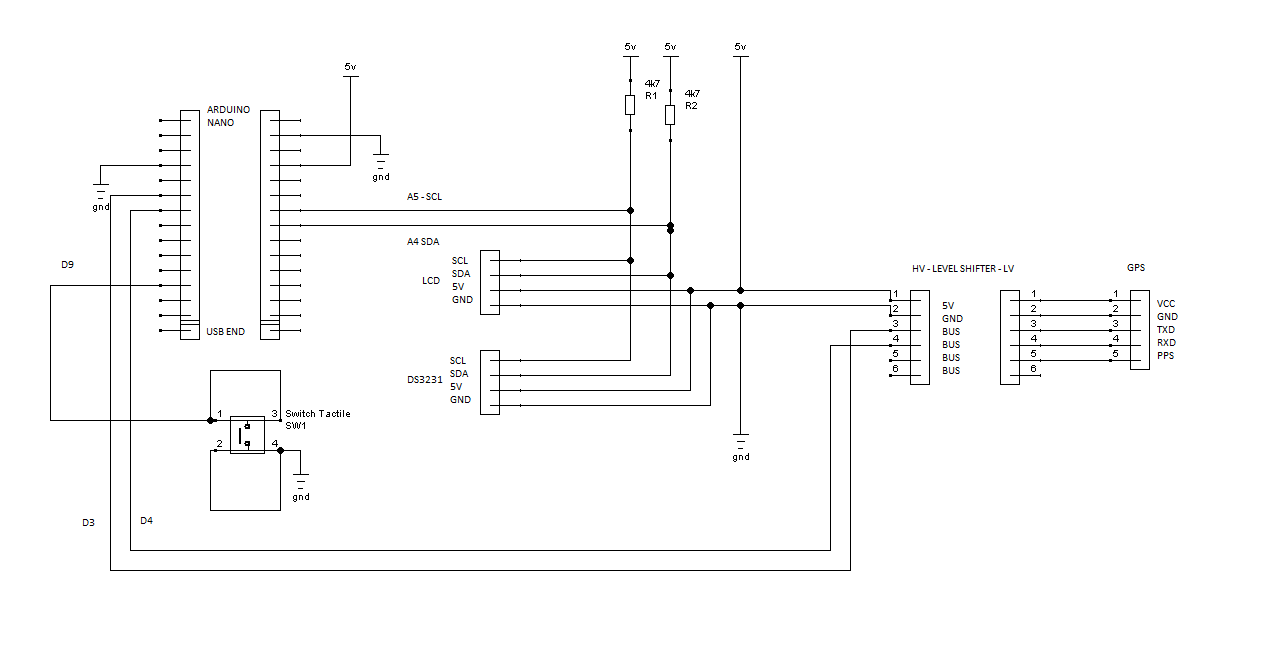
LCD 适配板 → Arduino
- GND → GND
- VCC → 5V
- SDA → A4 (SDA)
- SCL → A5 (SCL)
DS3231 → Arduino (共用 I2C 总线)
- GND → GND
- VCC → 5V
- SDA → A4
- SCL → A5
电平转换 → Arduino
- 5V → 5V
- GND → GND
- D3 → BUS
- D4 → BUS
NEO-6M GPS → 电平转换
- 3V → VCC
- GND → GND
- BUS → TXD (最终接 D3)
- BUS → RXD (最终接 D4)
按键
- 一端 → D9
- 另一端 → GND
供电
通过 USB 线供电。
软件架构
99% 代码基于 Adafruit GPS 库的 parsing.ino 示例,仅添加将解析出的 GPS 日期时间写入 DS3231、并在 LCD 显示 DS3231 时间的代码。
使用库
- Adafruit GPS Library v1.0.3
- RTCLib (Adafruit) v1.2.0
- NewLiquidCrystal (I2C 适配板)
操作流程
- 上电,LCD 显示 DS3231 当前时间
- 等待 GPS 定位 (红灯闪烁为佳,室内可能需 10+ 分钟)
- 按下按钮,通过 GPS 信号校时
- LCD 显示新时间
局限与注意事项
- GPS 定位需时间,无指示灯确认锁定;未定位按校时会把 DS3231 设为 2000-0-0 0:0:0
- DS3231 备用电池若亏电,首次校时可能异常 (如 0:164:164),需充电后才正常走时
- NEO-6M 模块标称 3V 工作,实测板载 4A2D 稳压芯片,但通信线未必电平转换,故加电平转换模块保险
- 室内 GPS 信号弱,带 LCD 可移至室外调试
- I2C LCD 地址可能为 0x3F (常见 0x27),显示异常请修改地址
- RTCLib 不写入 DS3231 星期寄存器,而是按公式实时算星期,避免闰年处理
- 代码默认 UTC 即本地时间,如有时区需自行添加转换
参考资料
[1] NEO-6 数据手册: u-blox.com
代码
// DS3231 + GPS 校时 + LCD 显示
#include
#include "RTClib.h"
RTC_DS3231 RTC;
char daysOfTheWeek[7][12] = {"Sunday","Monday","Tuesday","Wednesday","Thursday","Friday","Saturday"};

#include
LiquidCrystal_I2C lcd(0x3F, 2, 1, 0, 4, 5, 6, 7, 3, POSITIVE); // 地址 0x3F

#define button 9

#include
#include
SoftwareSerial mySerial(3, 2); // RX, TX
Adafruit_GPS GPS(&mySerial);
#define GPSECHO false
boolean usingInterrupt = false;
void useInterrupt(boolean);

void setup() {
  Serial.begin(115200);
  Serial.println("Adafruit GPS library basic test!");
  GPS.begin(9600);
  GPS.sendCommand(PMTK_SET_NMEA_OUTPUT_RMCGGA);
  GPS.sendCommand(PMTK_SET_NMEA_UPDATE_1HZ);
  GPS.sendCommand(PGCMD_ANTENNA);
  useInterrupt(true);
  delay(1000);
  mySerial.println(PMTK_Q_RELEASE);

  lcd.begin(16,2); lcd.backlight(); lcd.clear();
  pinMode(button, INPUT_PULLUP);
}

SIGNAL(TIMER0_COMPA_vect) {
  char c = GPS.read();
  #ifdef UDR0
  if (GPSECHO && c) UDR0 = c;
  #endif
}

void useInterrupt(boolean v) {
  if (v) {
    OCR0A = 0xAF;
    TIMSK0 |= _BV(OCIE0A);
    usingInterrupt = true;
  } else {
    TIMSK0 &= ~_BV(OCIE0A);
    usingInterrupt = false;
  }
}

uint32_t timer = millis();
void loop() {
  if (!usingInterrupt) {
    char c = GPS.read();
    if (GPSECHO && c) Serial.print(c);
  }
  if (GPS.newNMEAreceived()) {
    if (!GPS.parse(GPS.lastNMEA())) return;
  }
  if (timer > millis()) timer = millis();

  // 按钮按下校时
  if (!digitalRead(button)) {
    RTC.adjust(DateTime(GPS.year, GPS.month, GPS.day, GPS.hour, GPS.minute, GPS.seconds));
    lcd.clear(); lcd.setCursor(2,0); lcd.print("Pressed set");
    delay(5000); lcd.clear();
  }

  DateTime now = RTC.now();
  lcd.setCursor(4,0);
  lcd.print(now.year(), DEC); lcd.print('/');
  lcd.print(now.month(), DEC); lcd.print('/');
  lcd.print(now.day(), DEC); lcd.print(' ');
  lcd.setCursor(4,1);
  lcd.print(now.hour(), DEC); lcd.print(':');
  lcd.print(now.minute(), DEC); lcd.print(':');
  lcd.print(now.second(), DEC); lcd.print(" ");
}
原理图
制造工艺