


ESP8266-01 + Arduino Nano 打造 Wi-Fi 智能家居控制器
物料清单
| 组件 | 数量 |
|---|---|
| Arduino Nano R3 | 1 |
| ESP8266-01 Wi-Fi 模块 | 1 |
| 双路继电器模块 (5 V 逻辑) | 1 |
| LED ×2 + 1 kΩ 电阻 ×2 | 各 2 |
| 1 kΩ / 2.2 kΩ 电阻 | 分压用 |
| 面包板、跳线、PCBWay 定制板(可选) | 1 套 |
工具与软件
- 烙铁、无铅锡丝、助焊剂
- Arduino IDE / VS Code (PlatformIO) / Autodesk Eagle (PCB 设计)
系统架构
手机/浏览器 (Client)
   │ HTTP GET /?pin=111
   ▼
ESP8266-01 (Web Server, 9600 baud, Station 模式)
   │ 串口 AT 指令 / 透传
   ▼
Arduino Nano (SoftwareSerial D2/D3)
   │ digitalWrite(pin, state)
   ▼
继电器 → 家电 / 灯泡
ESP8266-01 关键配置流程
1. 引脚定义与供电
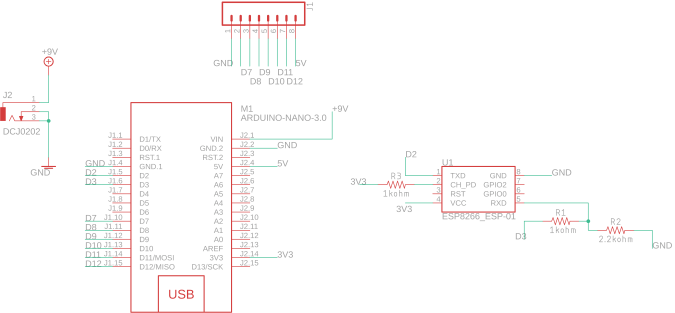
- VCC/CH_PD → 3.3 V(严禁 5 V)
- GND 共地
- TX → Nano D2 (SoftwareSerial Rx)
- RX → Nano D3 (SoftwareSerial Tx) 经 1 k/2.2 k 分压
- RST 悬空或接高电平
2. 降波特率至 9600(出厂 115200)
- 上传空 sketch 到 Nano,释放硬件串口
- ESP8266 直连 Nano 硬件串口 (D0/D1),串口监视器 115200、Both NL & CR
- 发送
AT→ 回OK - 发送
AT+UART_DEF=9600,8,1,0,0(或AT+CIOBAUD=9600) - 改监视器波特率 9600,再发
AT验证
3. 连网并启用 Server
AT+CWMODE=1
AT+CWJAP="YourSSID","YourPass"
AT+CIFSR          // 查 IP
AT+CIPMUX=1       // 多连接
AT+CIPSERVER=1,80 // 端口 80 开启 HTTP Server
Web 控制页面 (HTML + jQuery)
<!DOCTYPE html><html><head><title>Smart Home</title>
<script src="https://ajax.googleapis.com/ajax/libs/jquery/3.3.1/jquery.min.js"></script></head>
<body style="background:seagreen;color:seashell;text-align:center">
<h1>Smart Home Control Panel</h1>
<button class="btn" id="111">Blue ON</button>
<button class="btn" id="110">Blue OFF</button><br>
<button class="btn" id="121">Red ON</button>
<button class="btn" id="120">Red OFF</button>
<script>
$(".btn").click(function(){
  var p = $(this).attr('id');  // 如 "111"
  $.get("https://192.168.1.4:80/", {pin:p}); // ★修改为 ESP 实际 IP
});
</script></body></html>
ID 编码规则:前两位 = Arduino 引脚号(11/12),最后一位 = 状态(1 开 / 0 关)。
Arduino 核心固件
#include <SoftwareSerial.h>
SoftwareSerial esp(2,3);        // Rx, Tx
#define BAUD 9600
#define DEBUG true

int blueLED = 11, redLED = 12;

void setup() {
  pinMode(blueLED, OUTPUT); pinMode(redLED, OUTPUT);
  digitalWrite(blueLED, HIGH); digitalWrite(redLED, LOW);
  Serial.begin(BAUD); esp.begin(BAUD);
  initWiFi();
}

void loop() {
  if (esp.available()) {
    if (esp.find("+IPD,")) {
      delay(1000);
      int connId = esp.read() - 48;
      esp.find("pin=");
      int pin = (esp.read()-48)*10 + (esp.read()-48); // 11/12
      int state = esp.read() - 48;                    // 1/0
      digitalWrite(pin, state);
      // 关闭 TCP 连接
      String cmd = "AT+CIPCLOSE="; cmd += connId; cmd += "\r\n";
      sendData(cmd, 1000, DEBUG);
    }
  }
}

// 发送 AT 指令并可选打印响应
String sendData(String cmd, int timeout, bool dbg) {
  String rsp = "";
  esp.print(cmd);
  long t = millis();
  while (millis() < t + timeout) {
    while (esp.available()) rsp += (char)esp.read();
  }
  if (dbg) Serial.print(rsp);
  return rsp;
}

void initWiFi() {
  sendData("AT+RST\r\n", 2000, DEBUG);
  sendData("AT+CWJAP=\"SSID\",\"PASS\"\r\n", 5000, DEBUG);
  sendData("AT+CWMODE=1\r\n", 1500, DEBUG);
  sendData("AT+CIFSR\r\n", 1500, DEBUG);
  sendData("AT+CIPMUX=1\r\n", 1500, DEBUG);
  sendData("AT+CIPSERVER=1,80\r\n", 1500, DEBUG);
}
高压负载接入:继电器模块
- IN1 → D11,IN2 → D12
- COM 接火线,NO 接负载另一端
- ⚠️ 高压操作务必断电、绝缘、符合规范
PCB 进阶:从面包板到量产
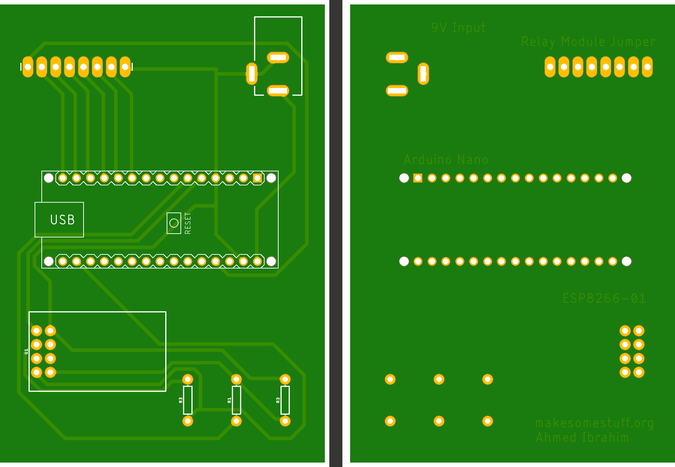
作者提供开源 Eagle 设计文件,可在 PCBWay 一键下单。双层板集成:
- ESP8266-01 插座 + 3.3 V LDO
- 分压电阻阵列
- 双路继电器驱动晶体管 + 飞越二极管
- 电源指示 LED、复位按键
常见故障排查
| 现象 | 排查项 |
|---|---|
| 按钮无响应 | ① 确认浏览器与 ESP 同一局域网 ② 检查 Web 页面 IP ③ 确认 Arduino D11/D12 接线 ④ 保存网页后强制刷新 |
| 串口乱码 | ESP 波特率未改为 9600 或 SoftwareSerial 引脚冲突 |
| 连不上 Wi-Fi | SSID/密码错误、信号弱、仅支持 2.4 GHz |
制造工艺
- 基于 Edge Impulse 的 TinyML 语言检测器:Arduino Nano 33 BLE Sense 实战
- Arduino Nano 与 MPU-6050 构建实时陀螺仪游戏
- Arduino 数字骰子:LCD 显示随机点数的电子骰子
- 用 Arduino 制作超声波悬浮装置:分步指南
- Arduino 与智能手机打造智能电压表——简单易做的 DIY 项目
- 基于 Arduino 与 MAX30100 的实时物联网心率监测系统
- 智能物联网罐:ESP8266 + Arduino + 超声波传感器实时监测罐内物位
- Arduino 声纳实时测距与 Processing 可视化
- Bolt IoT + Arduino UNO 实现 6 路 LED 无级调光
- 通过 Arduino IoT Cloud 用 Alexa 控制电视:分步指南
- 使用 Arduino Nano 和 RDA8057M 制作紧凑型 FM 收音机
- Arduino Nano 驱动 NeoPixel 矩阵:自制霓虹乒乓游戏